How to Set Up Swing Trading Alerts: A Strategy-First Approach
Barber and Odean's study of 66,465 retail brokerage accounts (Journal of Finance, 2000) found that the most active traders underperformed the market by 6.5 percentage points annually -- primarily because excessive trading multiplied exposure to bad timing. Swing trading alerts reduce bad timing by automating the detection work and notifying you only when the right conditions align -- not every time price twitches.
The difference between a useful alert and noise is not the platform you use. It is the specificity of the conditions you encode.
Why Most Swing Trading Alerts Generate Noise
Generic alert systems fire on a single condition -- price crossed above SMA50, volume exceeded average, RSI dropped below 40. These thresholds are too broad to be useful. They fire equally for high-quality breakouts in confirmed uptrends and dead-cat bounces in Stage 4 declines, and the trader still has to manually assess trend structure, RS rank, and regime -- which is the entire job the alert was supposed to handle.
A single-condition alert cannot distinguish setup quality. A "price breaks above a 10-day range" trigger fires hundreds of times per week across 2,000 stocks -- most of them in the wrong market environment, the wrong trend phase, or the wrong pattern structure. The result is alert fatigue: you start ignoring notifications because most of them lead nowhere. When a genuine setup fires, you miss it.
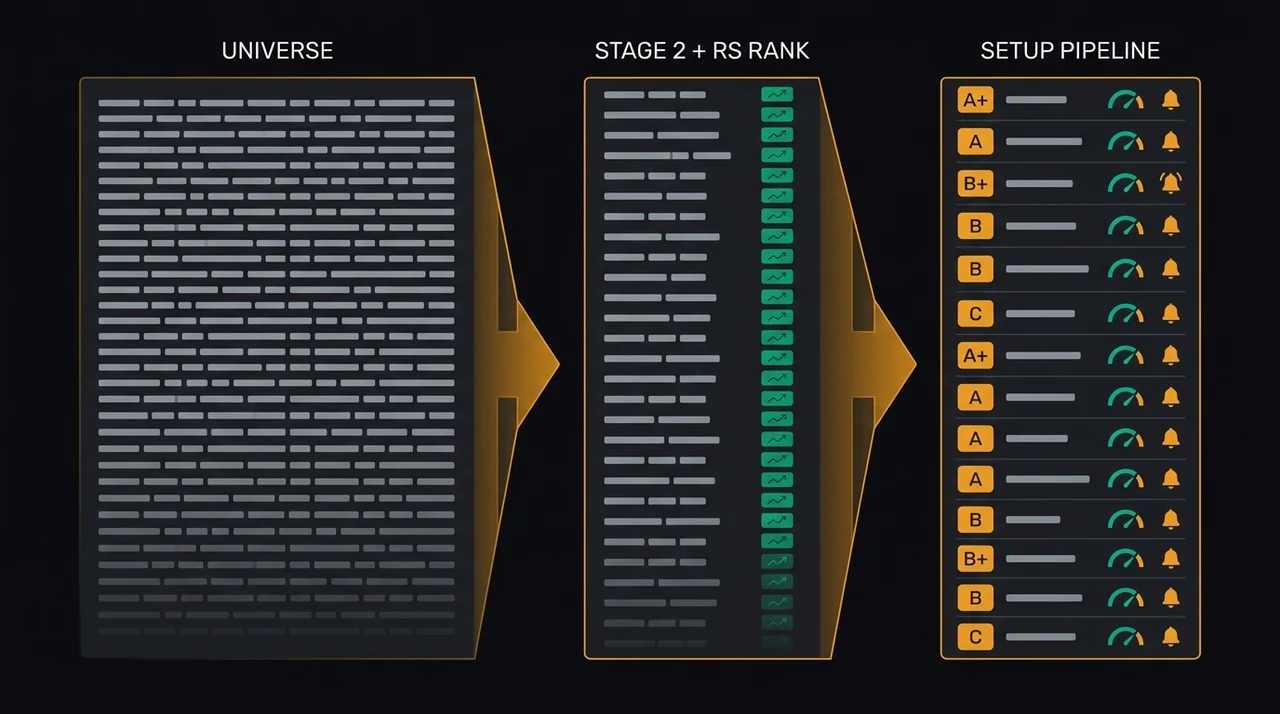
Strategy-specific alerts solve this by encoding multiple conditions that must all align simultaneously: trend phase, relative strength rank, volume behavior, named pattern structure, and market regime. When all five align, the alert fires. When any one fails, it stays silent. Fewer alerts, each with a substantially higher probability of being a genuine setup.
The 5 Conditions Every Swing Trading Alert Needs
A robust swing trading alert encodes five conditions: strategy type, entry trigger, trend structure, relative strength filter, and market regime gate. A single-condition alert catches too much. A five-condition alert catches almost exclusively genuine setups -- and stays quiet the rest of the time.
1. Strategy type Define which setup pattern the alert monitors. A VCP alert tracks decreasing volatility contractions. An HHV Breakout alert monitors a close above the prior 20-day high in an uptrending stock. An RSI(2) Leader Dip alert watches for an extreme short-term RSI(2) oversold reading in a stock above its 200-day MA. Different setups require completely different detection logic -- treating them interchangeably is the root of most alert noise.
2. Entry trigger The specific condition that signals it is time to act: price clearing the pivot on a VCP breakout, RSI recovering above 30 on a bounce entry, price reclaiming EMA9 on a pullback re-entry. This is the final gate that converts "setup forming" into "setup triggering now." Without a precise entry trigger, the alert fires too early -- when the setup is still building, not ready.
3. Trend structure The stock must be in the correct trend phase. For long setups, Stage 2 is required: price above SMA50, SMA150, and SMA200, all rising. Mark Minervini documented in Trade Like a Stock Market Wizard (2013) that over 70% of his winning trades from 1997 to 2007 were in Stage 2 uptrends at entry. For short setups, Stage 4 is required: price below all three moving averages, all declining.
4. Relative strength filter RS rank screens out weak stocks before the alert ever fires. For momentum breakout alerts (VCP, bull flag), RS rank 85 or above is the standard starting threshold. For mean reversion alerts, RS rank 70+ is sufficient -- you are buying a temporary dip in an otherwise strong stock. Short alerts use RS rank below 30 to isolate stocks already losing relative to the market.
5. Market regime gate The regime determines which strategies produce reliable follow-through. In a "Trending Up" regime, momentum breakout alerts are high-probability. In a "Ranging" regime, mean reversion alerts outperform. In a "Trending Down" or "High Volatility" regime, long alerts carry elevated failure rates. Without a regime filter, your breakout alerts fire during corrections with the same frequency as during bull markets -- but resolve in the opposite direction.
Alert Configuration by Strategy Type
The entry trigger and supporting conditions differ for each swing setup. Configuring alerts strategy-by-strategy -- rather than applying a single universal threshold -- is what separates a precision notification system from a screen that fires on anything. The tables below show the minimum conditions for the four most common swing alert types.
Momentum Breakout Alerts (VCP and HHV Breakout)
These fire when a stock with a completed base (VCP) crosses its pivot level on expanding volume, or when an uptrending leader closes above its prior 20-day high (HHV Breakout). They capture the start of a directional move where institutions have absorbed the available supply.
| Condition | VCP Alert | HHV Breakout Alert |
|---|---|---|
| RS rank | 85+ | 85+ |
| Volume on breakout | 1.5× 50-day average | 1.5× 50-day average |
| Distance from pivot | Within 5% | Within 3% |
| Trend structure | Stage 2 | Stage 2 |
| Regime gate | Trending Up | Trending Up |
Full VCP detection logic: VCP Setup Guide.
RSI(2) Leader Dip Alerts
These monitor for temporary oversold conditions in stocks with strong underlying trend structure. Larry Connors documented in Short-Term Trading Strategies That Work (2008) that buying S&P 500 components when RSI(2) dropped below 10 while price remained above the 200-day MA produced average 3-day gains of 2.1% versus 0.3% for random entries.
| Condition | RSI(2) Leader Dip Alert |
|---|---|
| RS rank | 70+ |
| RSI(2) at trigger | Below 25 (below 10 grades higher) |
| Price relative to SMA200 | Above (Stage 2 intact) |
| ADX(14) | Above 20 (trend confirmed) |
| Regime gate | Ranging or Trending Up |
RSI(2) Leader Dip is one of EasySwing's 13 active named strategies — see /strategies for the full list.
Trend Pullback Alerts
These fire when a trending stock pulls back to the EMA9/EMA20 zone on declining volume -- the re-entry point for a continuing uptrend. Declining volume on the pullback is a required condition: it signals a pause in an uptrend, not distribution.
| Condition | Trend Pullback Alert |
|---|---|
| RS rank | 80+ |
| MA alignment | EMA9 > EMA20 > SMA50 > SMA200 |
| Volume on pullback | Below 50-day average |
| Entry trigger | Price touches EMA20, volume declining |
| Regime gate | Trending Up or Ranging |
Short Setups (Currently Retired)
Short alerts only make sense in "Trending Down" or "High Volatility" regimes. Bear Flag was one of EasySwing's two short-side detectors -- a Stage 4 stock forming a consolidation (the flag) after a sharp decline and breaking lower -- but it's retired from the active screener after failing its holdout gate, as is RSI Overbought, so EasySwing does not currently surface any short setups or short alerts. For the short-side mechanics as education, see Bear Flag Short Setup Guide.
Market Regime Gating: The Alert Filter Most Traders Skip
Market regime is the most commonly absent element in retail alert configurations -- and one of the highest-impact changes you can make. Without a regime filter, the same momentum breakout alert fires with equal confidence during a broad bull market and a bear market correction. The chart pattern looks identical. The probability of follow-through is not.
Minervini writes in Momentum Masters (2015): "The number one factor determining whether a trade works is the condition of the general market." Breakout setups in "Trending Down" regimes fail at elevated rates because the broad market headwind reduces the institutional buying pressure available to drive individual breakouts. The setup forms -- but nothing follows.
EasySwing tracks five regime states and gates alerts accordingly:
| Regime | Recommended Alert Types |
|---|---|
| Trending Up | Momentum breakouts (VCP, HHV Breakout), trend pullbacks |
| Ranging | Snapback Z-Score, RSI(2) Leader Dip, trend pullbacks; reduced breakout exposure |
| Trending Down | Long alerts suspended -- EasySwing currently surfaces no short setups |
| High Volatility | Long setups restricted; wait for the regime to stabilize |
| Transitioning | All alerts fire at reduced frequency; extra confirmation required |
A properly gated alert library means your long alerts go quiet during corrections without any manual intervention, then resume when the regime turns back. For the market context that drives these gates, see Market Regime Analysis.
How to Set Up Alerts in EasySwing
EasySwing provides two alert modes: strategy mode and raw filter mode. Strategy mode is the faster path for most swing traders.
Strategy mode selects one of EasySwing's 13 named strategies (see /strategies for the full list) and a minimum grade threshold. Choose the strategy you want to monitor, then set the minimum grade -- A or B for tighter precision, C for wider coverage. Set the minimum RS rank. The regime filter applies automatically: the alert fires only when the current market regime supports the selected strategy, with no manual regime-tracking required.
Raw filter mode exposes individual parameters directly: RSI range, volume multiplier, distance from pivot, and moving average alignment. This mode is for traders who want to build custom conditions that do not map to a single named strategy. It requires more manual regime management -- you decide which raw alerts to activate in each market environment.
Telegram delivery is available for both modes. Connect your Telegram account in Settings, copy your chat ID, and paste it into the alert form. When the alert fires, EasySwing sends a message with the symbol, the setup type, the grade, and the key entry parameters -- so you can assess the signal without opening the screener first.
For the broader screening workflow behind alert configuration, see How to Use a Stock Screener for Swing Trading.
Swing Trading Alert Activation Checklist
Before enabling any alert, verify these conditions against the five-element framework. An alert built on a single-condition trigger creates noise that trains you to ignore notifications -- including the genuine setups that matter.
Setup and entry trigger
- ✅ Strategy type is specified -- not a generic "price above X" condition
- ✅ Entry trigger is specific to the strategy (pivot break for VCP, RSI recovery for mean reversion, EMA9 reclaim for pullback)
- ✅ RS rank filter matches the strategy type (85+ for breakouts, 70+ for mean reversion)
- ✅ Trend structure check is active (Stage 2 confirmed before the alert fires)
- ❌ Do not activate a breakout alert without a trend structure requirement -- too many false signals from stocks in Stage 3 distribution or Stage 4 decline
Market regime gating
- ✅ Regime gate is enabled and appropriate to the strategy
- ✅ Long momentum alerts are gated on Trending Up (or Ranging for mean reversion and pullback setups)
- ✅ EasySwing currently surfaces no short setups -- both of its short-side detectors (Bear Flag, RSI Overbought) are retired
- ❌ Do not run momentum breakout alerts without a regime filter -- failure rates rise sharply during corrections and distribution phases
Risk management integration
- ✅ Alert includes the stop level for reference (below pivot low for VCP, below the pullback low for a trend pullback)
- ✅ Position size is calculated before entry using the stop distance and your fixed account risk percentage
- ✅ Earnings date verified -- no active setup through earnings without a planned holding strategy
- ❌ Do not use market orders on alert signals -- enter via limit order within the buy zone to control entry price
- ❌ Do not skip verifying stop placement on a live chart before entry -- alert conditions are confirmed at the time of firing, not necessarily at the time of your order
For position sizing rules and R-multiple targets for each setup type, see Position Sizing and R-Multiples.
Frequently Asked Questions
What is a swing trading alert? A swing trading alert notifies you when a stock meets the conditions for a defined setup -- such as a VCP breakout, RSI(2) dip bounce, or trend pullback entry. Unlike a generic price alert, a strategy-specific swing trading alert encodes multiple conditions simultaneously: trend structure, relative strength, volume pattern, and market regime. It fires only when all conditions align.
How many active swing trading alerts should you run? Five to ten active alerts is the practical range for most swing traders. More than that creates notification overhead without improving signal quality. Fewer alerts with tighter multi-condition logic produce better results than dozens of alerts with single-condition triggers. If you find yourself ignoring most alerts, the alert conditions are too loose -- tighten the grade threshold or raise the RS rank minimum.
When is the best time to configure swing trading alerts? The most productive window is the evening after the market close. EasySwing runs its scan after 4pm ET and refreshes setup grades by early evening. Reviewing the scan results then and activating alerts based on that evening's output positions you to receive notifications at or before the next session's open when setups trigger.
Do swing trading alerts work in volatile markets? In "High Volatility" regimes, alerts require additional confirmation before acting on them -- wider price swings increase false breakout rates and stop-out frequency. The response is to raise the grade threshold to A-only, require RS rank 90+, and reduce position size. EasySwing's strategy-mode alerts handle this automatically: the regime gate restricts long momentum alerts when volatility is extreme.
What is the difference between a swing trading alert and a live signal? A signal is generated automatically when the scanner detects a setup match. An alert is a saved configuration that converts matching signals into real-time notifications. EasySwing combines both: daily scans generate signals visible in the StockFinder, and active alerts push those signals to your notification panel and Telegram when they match your saved strategy and regime criteria.
EasySwing.trading screens 2,000+ stocks automatically each evening for the conditions described in this guide -- VCPs, trend pullbacks, RSI(2) dips, and HHV breakouts -- and fires alerts when the regime and strategy filters align. For the setup context behind each alert type, see Swing Trading Examples: 5 Real Setups and Swing Trading Strategies: 8 Proven Setups. For the technical indicators that trigger each alert condition, see Best Indicators for Swing Trading. Scan results are for informational purposes only. See our Risk Disclaimer.
Disclaimer: This article is for educational purposes only and does not constitute investment advice. EasySwing is a stock screening tool, not a registered investment advisor. All trading involves risk. Read our full disclaimer →