Swing Trading Watchlist: How to Build and Work Your Setup Pipeline
O'Neil's study of 600+ major stock market winners found that 95% showed a recognizable technical pattern before their biggest price advances (How to Make Money in Stocks, 4th ed., 2009). That finding defines the swing trading watchlist problem: you cannot evaluate 2,000 stocks daily, so your watchlist needs to be a short, ruthlessly filtered pipeline — not a collection of interesting names.
A swing trading watchlist is a pre-screened pipeline of 10-25 setup candidates that have cleared all your screening criteria and are waiting for a specific entry trigger. Most traders treat it as a contact list for stocks they find interesting. That framing creates a watchlist that is too long to monitor, too broad to prioritize, and too undisciplined to drive consistent execution.
What a Swing Trading Watchlist Is (and Isn't)
A working swing trading watchlist holds stocks that have cleared Stage 2 trend structure, relative strength rank above 80, and named pattern formation — and are waiting for a specific entry trigger. It differs from a research list, which holds stocks you find interesting. The distinction determines whether you respond to markets or anticipate them.
What it is: A filtered, prioritized list of setup candidates that have simultaneously cleared all your criteria — Stage 2 structure intact, RS rank in leadership territory, named pattern actively forming, and market regime compatible — and are close enough to a trigger that an alert is worth configuring.
What it isn't: A collection of stocks you read about in a financial newsletter. A list of companies you respect fundamentally. A parking lot for "stocks to research later." Those are research tasks. They belong in a notes document, not in a pipeline you monitor daily for entry triggers.
Mark Minervini described the logic in Trade Like a Stock Market Wizard (2013): "I narrow my universe down to the handful of stocks that meet all my criteria simultaneously — not stocks that might meet them eventually." The word simultaneously is the operational test. A stock that meets four of five criteria is not yet a watchlist candidate. It is a candidate to re-check tomorrow.
How to Populate Your Watchlist: The Three-Stage Funnel
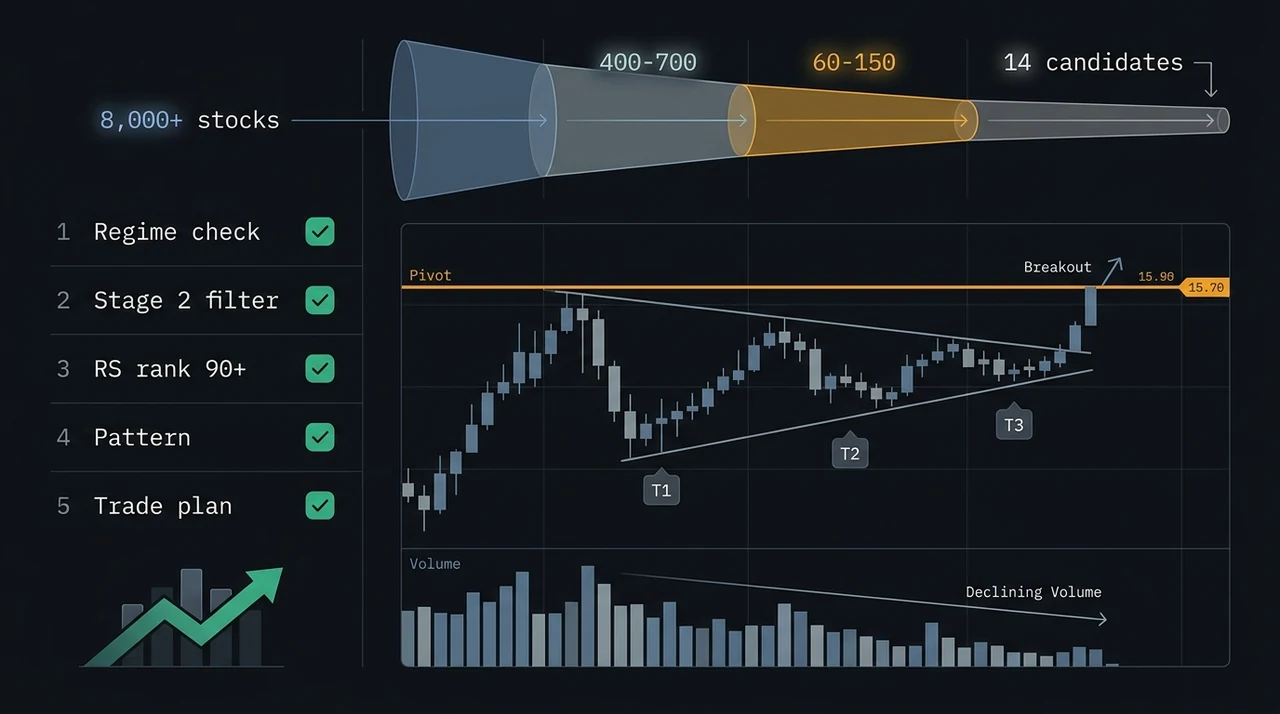
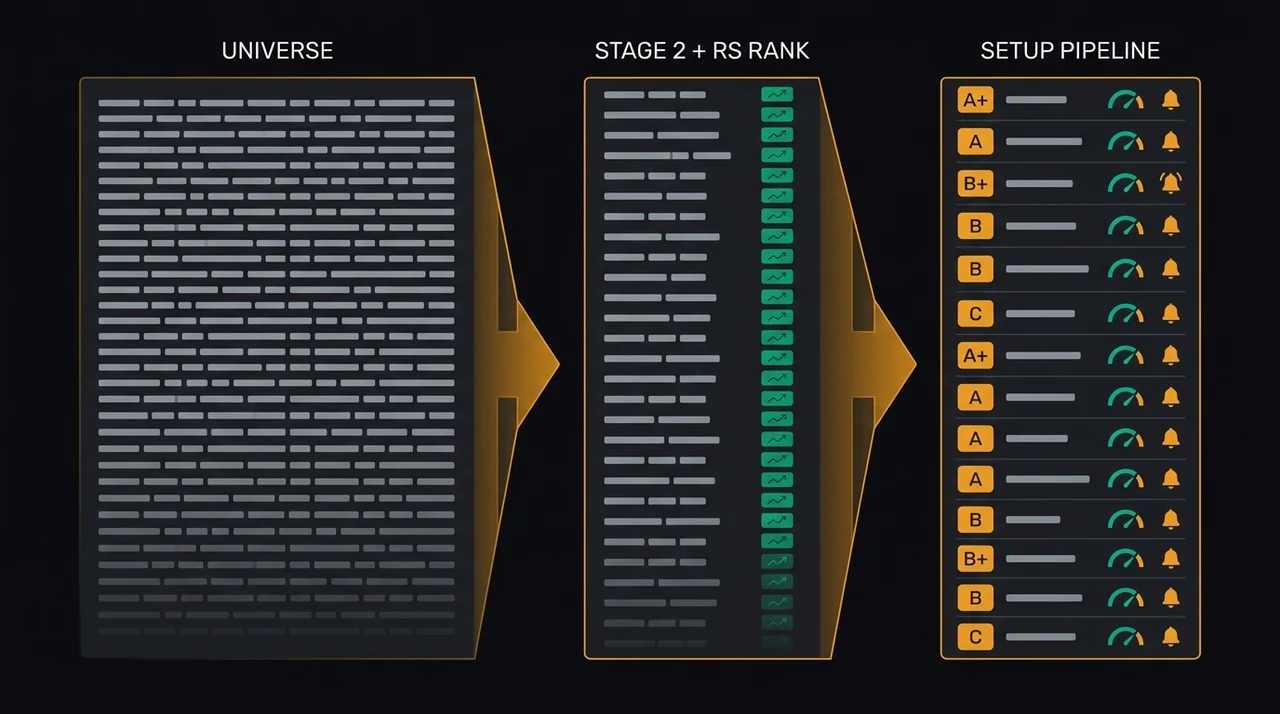
Three sequential filters convert 2,000+ equities to a 10-25 stock watchlist. Stage 1 narrows the full universe to candidates with correct technical structure. Stage 2 confirms a named setup is actively forming. Stage 3 identifies which candidates are approaching a live entry trigger.
Stage 1: Universe screen. After each session close, run your primary screener filters. At minimum: Stage 2 trend structure (price above SMA50 above SMA150 above SMA200, all rising), RS rank above 80, relative volume above 1.0x during the base, and market cap in your target range ($200M–$20B covers the liquidity sweet spot for swing holding periods). This typically narrows 2,000+ stocks to 40-80 candidates. For the filter mechanics, see how to use a stock screener for swing trading.
Stage 2: Named setup qualification. Of those 40-80 candidates, identify which have a named setup actively forming. Is this stock building a VCP — tightening contractions, declining volume on pullbacks, volume expanding at the pivot? Is it forming a Qullamaggie Breakout — a tight consolidation riding the rising EMA10/EMA20 after a sharp momentum leg, ready to break out on expanding volume? Only stocks where a specific, defined setup is in progress qualify for the watchlist. Named setup detection matters because "looks like it might do something" is not a trading edge — the compound confirmation conditions of a verified named setup are.
EasySwing.trading detects 13 named setups automatically at session close: VCP Breakout, Cup & Handle, Qullamaggie Breakout, Trend Pullback, MA Stack Confluence, and others. Each result carries a letter grade (A+/A/B+/B/C) and a pre-calculated entry price, stop-loss, and two targets. The grade system separates borderline setups (C grade: one or two confluence conditions weak) from high-conviction candidates (A+ grade: all conditions strong). For standard position sizes, Grade B or better is a reasonable minimum.
Stage 3: Trigger proximity monitoring. The final stage identifies which watchlist stocks are within 2-3% of their entry trigger. A VCP candidate approaching its pivot buy point is "approaching." A Qullamaggie Breakout candidate that completed its consolidation and is expanding volume through the range high is "triggered." Stocks approaching triggers get alert configurations; stocks still deep in base formation stay on the list without alerts.
The three-stage funnel converts a daily screening pass into a prioritized action queue. Stocks in Stage 1 only are candidates for next week. Stocks that pass Stages 1 and 2 are active watchlist holdings. Stocks passing all three stages are immediate attention candidates.
Right-Sizing Your Watchlist: The Regime-Adjusted Range
Ten to twenty-five is the working range for most swing traders. Fewer than 10 creates scarcity pressure, pushing you toward sub-standard setups. More than 30 diffuses attention across too many triggers to monitor precisely. The right number varies by regime — a TRENDING_UP tape supports a longer list, while RANGING, HIGH_VOLATILITY, or TRENDING_DOWN markets warrant fewer.
Jegadeesh & Titman (Journal of Finance, 1993) demonstrated that momentum-based selection works through concentration: the top decile of momentum stocks significantly outperforms the second and third deciles in subsequent periods. A short, strictly screened watchlist is the practical implementation of that finding — you are concentrating in the top candidates, not tracking the broad momentum universe.
The other constraint is position capacity. If you are running five open positions sized at 1% account risk each, you have capacity for three to five additional positions before reaching a typical 8-10% gross exposure ceiling. A 30-stock watchlist does not add useful optionality when you can only act on three to five names — it adds management overhead without increasing the quality of your execution.
| Market Regime | Recommended Watchlist Size | Active Setup Families |
|---|---|---|
| TRENDING_UP (Strong Bull) | 20–25 stocks | Breakout, Momentum, Continuation |
| RANGING (Choppy/Neutral) | 10–15 stocks | Pullback, Mean Reversion, Range-Bound |
| TRANSITIONING | 8–12 stocks | Pullback, selective Breakout |
| HIGH_VOLATILITY | 5–10 stocks | Mean Reversion, hedges, or cash |
| TRENDING_DOWN (Strong Bear) | 3–8 stocks | Bear Flag, RSI Overbought, or cash |
The regime column in the table matters for a second reason: a watchlist populated during a TRENDING_UP regime contains primarily breakout candidates. When the regime shifts to RANGING, those candidates have lower expected follow-through. Review and prune the list at each regime transition. For the five-state regime framework and how to read it, see market regime: how to read bull, bear, and choppy markets.
Managing and Pruning Your Watchlist
A watchlist that isn't pruned daily becomes a parking lot. Three clear disposition rules keep it current: remove stocks whose base formation has deteriorated; remove triggered-without-action stocks rather than holding for a lower pullback; and bulk-review the list at every regime transition.
Prune on base failure. A stock building a VCP that suddenly expands in volatility — wide-ranging bars, expanding volume on down days, close below the SMA50 — is no longer in a valid contraction phase. Remove it immediately. Don't wait to see if it recovers; the original setup thesis has broken. Re-screen it in three to four weeks if the structure reforms cleanly.
Prune on trigger without action. If a stock breaks out while you were at capacity or away from the screen, remove it rather than holding it for a subsequent pullback entry at the same trigger level. Extension entries — buying a stock that has already moved 8-15% past your identified trigger — carry materially lower follow-through probabilities than base-breakout entries. If the stock establishes Stage 2 continuation, it may become a valid pullback-to-rising-MA candidate in 2-4 weeks. Re-add it under that setup family.
Prune on regime shift. When the market regime transitions from TRENDING_UP to RANGING, HIGH_VOLATILITY, or TRENDING_DOWN, conduct a systematic watchlist review. Momentum and breakout setups that were valid in a trending regime carry lower expected value in a non-trending regime. Range-bound setups become relatively more attractive. Refreshing the watchlist composition to match the current regime is not reactive portfolio management — it is the primary discipline separating full-cycle traders from traders who give back trending-regime profits in the transition.
Add systematically, not reactively. The daily screener pass is your primary supply channel. Resist adding stocks because you saw them discussed in a trading community, financial media, or social feed. That path populates your watchlist with ideas that cleared someone else's criteria rather than yours. The watchlist reflects your system's output. When external sources generate ideas you want to evaluate, run them through Stage 1 and Stage 2 criteria first — add them only if they pass.
From Watchlist to Alert to Trade
The watchlist is not the endpoint of a process — it is the middle stage. The sequence is screen → watchlist → alert → trade. Alerts codify the trigger condition for each candidate. Position sizing should be pre-calculated before the alert fires, not during the breakout.
Alert configuration. An alert for a VCP Breakout candidate fires when the stock closes above its pivot buy point on expanding RVOL, in a compatible regime, at Grade A or better. An alert for a Trend Pullback candidate fires when price touches the EMA9/EMA20 zone with a confirming reversal candle in a TRENDING_UP regime. The alert encodes the same conditions you used to qualify the setup — it does not add new conditions, and it does not replace the trigger check with a raw price threshold.
An alert set 3% above the actual pivot is not useful. At that price, the stock has already moved through your intended entry zone. An alert set exactly at the pivot, with a Grade A minimum filter and a regime gate, fires at the right moment and suppresses false positives from marginal setups that technically hit the price threshold but lack the quality conditions. For the full alert setup mechanics, see how to set up swing trading alerts.
Pre-sizing. Before an alert fires, calculate the position size using the stop-loss level from the setup card and your standard 1% account risk rule. When the alert fires during a breakout, you have 30-90 seconds of favorable entry window before the stock extends. If you are calculating position size in real time under that pressure, you introduce two errors: mathematical errors from rushed calculation, and FOMO-driven oversizing from not wanting to "miss" the move. Pre-sizing eliminates both. For the R-multiple position sizing formula, see position sizing with R-multiples.
Watchlist Management Checklist
Run this checklist before each session opens:
- ✅Run the screener pass for today's candidates; add Stage 1 + Stage 2 qualifiers to the watchlist
- ✅Review all existing candidates: has any base formation deteriorated since the last session?
- ✅Check the current market regime: does it support the setup family for each watchlist stock?
- ✅Identify approaching-trigger candidates: which stocks are within 2–3% of their pivot buy point?
- ✅Confirm alerts are configured for approaching-trigger candidates with correct price, Grade filter, and regime gate
- ✅Pre-size each approaching-trigger candidate against today's account equity and your 1% risk rule
- ✅Prune any triggered-without-action stocks that have already moved past the valid entry zone
- ❌Don't add stocks you saw discussed externally unless they independently cleared your Stage 1 and Stage 2 criteria
- ❌Don't hold triggered-without-action stocks hoping for a pullback entry at the same price level
- ❌Don't maintain 30+ stocks on the watchlist during RANGING, HIGH_VOLATILITY, or TRENDING_DOWN market regimes
- ❌Don't skip the regime check — a watchlist built for TRENDING_UP conditions performs differently in RANGING
- ❌Don't configure price-only alerts without the Grade minimum and regime gate conditions
EasySwing.trading screens for swing trading setups automatically across 2,000+ US equities each session, grades each result A+/A/B+/B/C, and applies a five-state market regime filter before delivery. The screener guide covers the StockFinder workflow; the alerts guide covers trigger configuration. Scan results are for informational purposes only. See our Risk Disclaimer.
Frequently Asked Questions
How many stocks should be on a swing trading watchlist?
Ten to twenty-five is the working range for most swing traders. Fewer than 10 creates scarcity pressure, pushing you toward sub-standard setups. More than 30 diffuses attention across too many candidates to monitor trigger conditions precisely. Adjust downward in RANGING, HIGH_VOLATILITY, or TRENDING_DOWN regimes — fewer quality setups qualify, and adding marginal candidates to reach an arbitrary count inflates the list without improving it.
How often should I refresh my swing trading watchlist?
Daily, after each session close. Run your screener pass, add new candidates meeting all Stage 1 and Stage 2 criteria, and prune stocks whose base formation has deteriorated or whose trigger has already fired without action. A watchlist that isn't updated daily accumulates stale candidates — stocks that passed criteria last week but no longer meet them today — which distorts your sense of available opportunities.
What's the difference between a watchlist and a screener?
A screener runs filters across the full universe and returns every stock meeting your criteria — potentially 40-100 results daily. A watchlist is the curated subset of screener output that has additionally cleared named-setup qualification and is being monitored for a specific entry trigger. The screener populates the watchlist; the watchlist holds pre-qualified candidates awaiting a specific entry trigger.
Should I have separate watchlists for different strategies?
Two lists is a practical maximum: one for breakout and momentum candidates (VCP, Cup & Handle, Qullamaggie Breakout), one for pullback and mean-reversion candidates (Trend Pullback). Each list has a defined regime condition — the breakout list is active primarily in TRENDING_UP; the pullback list is active in TRENDING_UP and RANGING. Beyond two lists, management overhead outweighs the organizational benefit.
How does EasySwing.trading support the watchlist workflow?
EasySwing.trading's StockFinder detects 13 named setups automatically after each session close, grades each candidate A+/A/B+/B/C, and applies the current market regime filter. You review that day's results, add qualifying candidates to your watchlist, and configure setup-gated alerts for approaching-trigger stocks — so the alert fires only when both the price condition and the regime condition are met simultaneously.
Disclaimer: This article is for educational purposes only and does not constitute investment advice. EasySwing is a stock screening tool, not a registered investment advisor. All trading involves risk. Read our full disclaimer →