EasySwing vs Schwab Stock Screener: What Swing Traders Need to Know
Charles Schwab reported approximately 34 million active brokerage accounts as of late 2023 — the largest US retail broker by client count after absorbing TD Ameritrade's 28 million customer base following their 2020 merger. That scale means a substantial portion of self-directed US equity traders start the session with the Schwab stock screener open. This comparison covers what Schwab's built-in screener actually provides, where it falls short for systematic swing trading, and where a named-setup detector handles the work that individual filters cannot.
The Short Answer
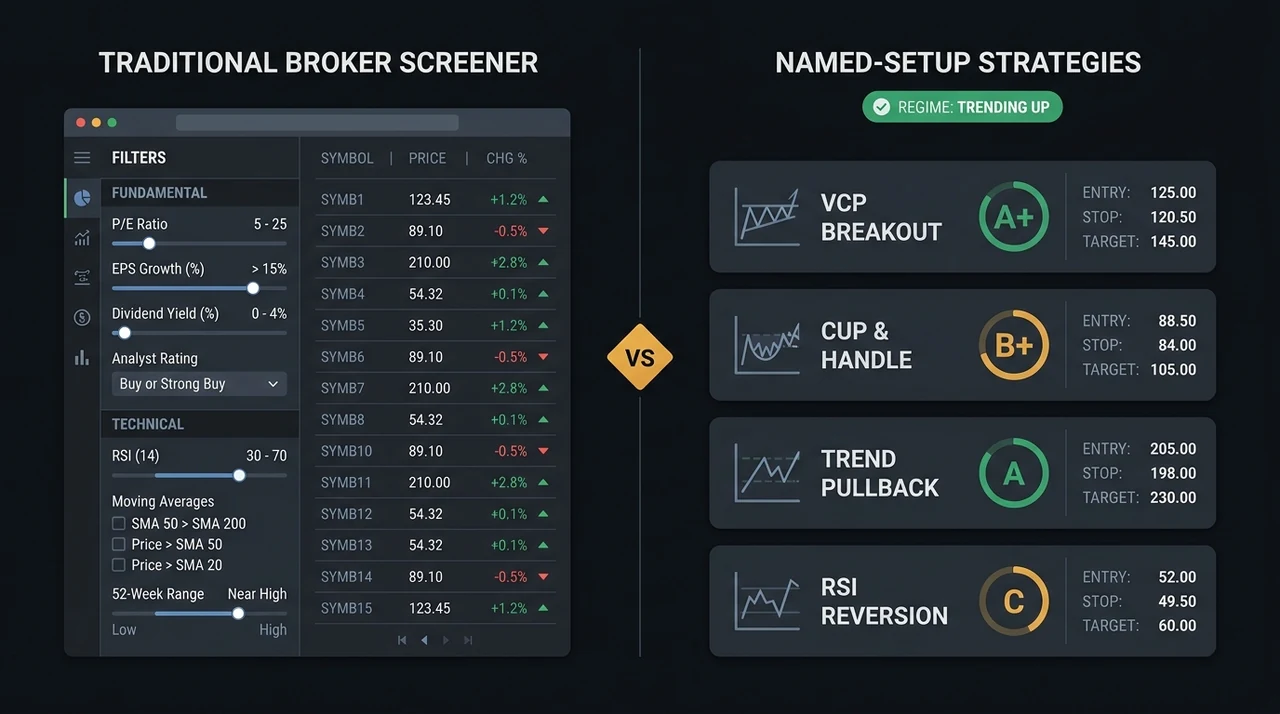
Schwab's stock screener is a browser-based filter tool available free to all account holders. It applies more than 140 individual criteria — technical conditions like RSI, moving average alignment, and 52-week range proximity, plus fundamental criteria like P/E ratio, EPS growth, and analyst consensus ratings — to generate a filtered list of stocks. EasySwing.trading identifies 13 named swing trading setups, grades each result A+ to C by technical quality, and gates every result against a five-state market regime engine updated each session. Both tools surface a shorter list of stocks. They answer different questions.
| Feature | Schwab Stock Screener | EasySwing.trading |
|---|---|---|
| Cost | Free (Schwab account required) | $49/mo ($39/mo annual) |
| Named setup detection | No | Yes (13 strategies, multi-layer) |
| Setup quality grading | No | Yes (A+/A/B+/B/C) |
| Market regime filter | No | Yes (5 states, updated daily) |
| Individual filter criteria | 140+ (technical + fundamental) | No raw filter mode |
| Fundamental data | Yes (P/E, EPS, dividends, ratings) | No |
| Real-time data | Yes (during market hours) | End-of-day (post-session) |
| Pre-calculated risk levels | No | Yes (entry, stop, T1, T2) |
| AI coaching per setup | No | Yes (Soren, per-candidate) |
| Setup-gated alerts | No (price alerts only) | Yes (Telegram, email) |
| Brokerage integration | Direct (trade tickets) | Screening only |
| Advanced scanner alternative | ThinkorSwim (separate platform) | — |
What the Schwab Stock Screener Does
Schwab's stock screener is a browser-based filter panel accessible to all brokerage account holders at no additional cost on schwab.com. It provides more than 140 filter criteria organized across three main categories: company data (fundamentals, sector, market cap), performance metrics (52-week range, 3-month return, dividend yield), and technical conditions (RSI, moving averages, Bollinger Bands, RVOL, MACD).
Fundamental screening is a genuine strength. Schwab's database includes earnings-per-share growth, price-to-earnings ratios, analyst consensus ratings, and sector classifications. For swing traders who apply William O'Neil's CANSLIM framework — where Current earnings (C) and Annual earnings (A) criteria require EPS data — Schwab's screener covers the fundamental half of the screen at no incremental cost. Running RSI below 40 alongside positive quarterly EPS growth is a two-click combination in Schwab's interface.
Preset screener templates ship with the platform for common investor profiles: "Income Investors," "High Growth Potential," and "Value Stocks." None are calibrated for swing trading methodology. There are no built-in templates for volatility contraction patterns, breakout setups, or momentum continuation entries. Traders building a swing screening process construct their own criteria sets from the full filter list.
Real-time data during market hours feeds the screen results. For traders running live screens during a session — filtering for intraday RSI extremes or real-time volume spikes as they form — Schwab's screener updates in near-real time. For the end-of-day approach EasySwing applies — post-session scan, single shortlist, next-morning action — the real-time feature is less relevant.
Schwab also operates ThinkorSwim, a substantially more advanced scanning platform with thinkScript programming for custom multi-condition real-time scans, Level 2 data, and deep charting tools. For that comparison, see EasySwing vs ThinkorSwim.
Where Schwab's Screener Falls Short for Systematic Swing Trading
Schwab's screener returns a list of stocks passing individual criteria thresholds. Compound named-setup detection — evaluating whether a VCP, Cup & Handle, or Qullamaggie Breakout has formed with all confluence conditions simultaneously met — is outside the architecture. The screener does not grade how well a candidate qualifies. The current market regime does not gate which types of setups surface. Pre-calculated entry, stop, and target levels are not provided on results.
No compound pattern logic. Applying RSI below 40, price above the 50-day moving average, and RVOL above 1.5x returns every stock meeting those three conditions. It does not evaluate whether the combination constitutes a valid RSI Mean Reversion setup — which requires price below the 50-day MA, RSI reaching below 30 after a prior uptrend, Stage 2 structural context, and regime clearance. Those additional conditions separate a tradeable setup from a raw filter hit. Mark Minervini documented in Trade Like a Stock Market Wizard (2013) that filtering without pattern-quality ranking still leaves the trader evaluating every result from the screen manually — which is the bulk of the work the screen was meant to shorten.
No quality grading. Every stock clearing Schwab's filter thresholds appears in the results list ranked identically by whatever sort column you choose. An A+ candidate — RS rank 91, tight 6-week base, expanding volume on breakout day, clean Stage 2 trend, regime Trending Up — and a C candidate — RS rank 57, wide 14-week base, lukewarm volume, regime Ranging — rank identically until the trader charts every result. Jegadeesh and Titman (Journal of Finance, 1993) showed that momentum strategies generate approximately 12% annual edge in favorable conditions. That edge is sensitive to setup quality — a poorly formed breakout in a weak-RS stock in a ranging market is a completely different bet than an A+ VCP in a Stage 2 leader in a trending regime.
No market regime filter. Schwab's screener runs the same filters regardless of whether the broad market is in a trending phase, a ranging phase, or an early bear trend. Strategies that generate edge in a trending regime frequently produce systematic losses in a ranging one. Without a regime gate, the screen generates the same output type on a day when momentum strategies have statistical backing and on a day when they do not.
What EasySwing.trading Does
EasySwing.trading runs 13 named swing trading strategies each session — VCP Breakout, Trend Pullback, Bear Flag, RSI Overbought, Swing Condor, Cup & Handle, Qullamaggie Breakout, MA Stack Confluence, ADX Trend Momentum, HHV Breakout, ROC Breakout, RSI(2) Leader Dip, and Snapback Z-Score — against 2,000+ US equities after each session close.
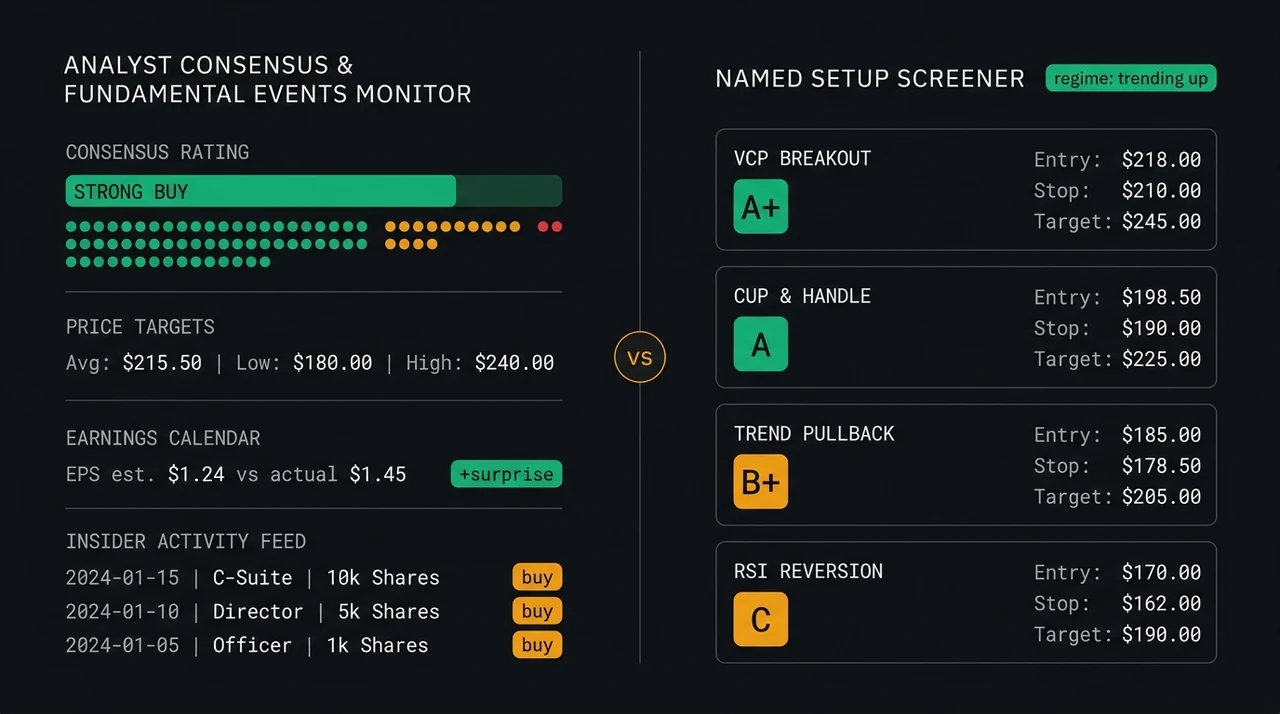
Each detected setup receives a letter grade (A+, A, B+, B, or C) calculated from a multi-factor quality score: relative strength rank against the full universe, Stage 2 trend alignment, volume confirmation, contraction quality, and setup-specific criteria. A+ setups show the highest confluence across all conditions. For traders applying a single position size per trade, concentrating on A+ and A setups improves expected value per trade taken. See swing trading strategies for the full grade definition and what each strategy checks.
A five-state market regime engine gates which strategies surface in any given session. The five states — Trending Up (Strong Bull), Ranging, Transitioning, High Volatility, and Trending Down (Strong Bear) — determine which of the 13 strategies are permitted to fire results and which are muted. In a Ranging regime, momentum breakout strategies are suppressed. In Trending Down or High Volatility regimes, long-side strategies are restricted. The market regime filter guide covers the full gating logic by state.
Each setup card includes the entry price zone, structural stop-loss level, first target (T1, approximately 1.5× risk), second target (T2, approximately 3× risk), and a Soren coaching note explaining what makes this candidate its specific grade. For the trade-by-trade mechanics of translating the entry and stop into position size, see position sizing with R-multiples.
Where Schwab's Screener Has the Edge
- ✅Fundamental filtering is native. P/E ratio, EPS growth, analyst consensus ratings, dividend yield, and sector classification are all filter criteria. For CANSLIM practitioners who need Current earnings (C) and Annual earnings (A) data before evaluating a technical entry, Schwab provides that at zero incremental cost.
- ✅Zero additional subscription cost. Any Schwab brokerage account holder accesses the full screener without adding a paid subscription. For traders running a two-tool setup — a charting or journaling tool plus a screener — using Schwab's free screener as a fundamental pre-filter keeps total tooling cost low.
- ✅Real-time intraday scanning. For traders running live screens during market hours — filtering for intraday RSI extremes, volume spikes, or breakout conditions as they develop — Schwab's screener updates in near-real time. EasySwing is an end-of-day tool only.
- ✅Direct brokerage integration. Screen results transfer directly into Schwab's trade ticket interface. For traders executing through Schwab, the path from screen result to order entry is shorter than with a separate screener.
- ✅Broader asset class coverage. ETFs, fixed income, preferreds, and international equities are screenable. EasySwing screens US equities only.
Where EasySwing.trading Has the Edge
- ✅Compound named-setup detection. A VCP Breakout is not "RSI above 50 plus price near 52-week high." It requires a contraction structure — progressively tighter price and volume swings across multiple pullbacks — in a Stage 2 trend, with RS rank leadership, on a breakout above the base high on above-average volume, in a regime that supports momentum. EasySwing evaluates all confluence conditions simultaneously. Schwab's screener cannot.
- ✅Setup quality grading. The A+/A/B+/B/C grade converts an unranked results list into a quality filter. A+ marks the cleanest confluence; the grade is not a return ranking. Traders concentrate review on the top tier without charting every result from a raw filter list.
- ✅Regime gating. In a Ranging or Trending Down regime, EasySwing's momentum breakout strategies mute automatically. The screener adjusts its output to current market conditions without manual filter changes.
- ✅Pre-calculated risk structure. Entry zone, stop-loss level, T1 at approximately 1.5× risk, and T2 at approximately 3× risk appear on every setup card. Position sizing can be calculated directly from the entry and stop without additional charting. Schwab's screener provides no risk structure on results.
- ✅Strategy-gated alerts. EasySwing alerts fire when a specific named setup forms on a watched symbol, gated by grade floor. Schwab provides raw price alerts only.
Which Tool Belongs in Your Workflow
The two tools solve adjacent problems. The most common workflow for systematic Schwab customers who use both: Schwab's screener for a fundamental pre-filter — EPS growth, market cap range, sector — then EasySwing to identify which of those names formed a high-quality named setup in the last session.
Choose Schwab's stock screener if:
- ✅You need fundamental criteria (EPS growth, P/E, analyst ratings) alongside technical conditions
- ✅You want intraday real-time scanning during market hours
- ✅You execute through Schwab and want results that link directly to trade tickets
- ✅You screen ETFs, dividend stocks, or non-US equities
- ✅You need a free starting point with no additional subscription
Choose EasySwing.trading if:
- ✅You trade named swing setups — VCP, Cup & Handle, Qullamaggie, Pullback to Rising MA, and others — and want those detected automatically rather than identified by manual chart review after a filtered list is generated
- ✅You want quality grading (A+/A/B+/B/C) to prioritize the strongest setups without reviewing every result
- ✅You want automatic regime gating so that breakout strategies mute in ranging or bear markets without manual filter adjustments
- ✅Your method is end-of-day: scan after close, review grades, act at the next session open
- ✅You want Soren's per-setup coaching and a built-in R-multiple journal to track results over time
- ❌EasySwing is not the right tool if you need intraday real-time data, live quotes during market hours, fundamental data integration, or direct brokerage order placement.
Frequently Asked Questions
Does Schwab's stock screener detect VCP or Bull Flag patterns?
No. Schwab's screener applies individual criteria thresholds — RSI below X, MACD above zero, price above the 50-day moving average — but cannot evaluate compound named-setup patterns. A VCP requires a contraction structure across multiple tightening swings with Stage 2 alignment and volume confirmation at the breakout. A Bull Flag requires a specific pole-and-consolidation geometry with RS rank leadership. Those evaluations require manual chart review after Schwab's screener generates its filtered list.
What is the difference between the Schwab Stock Screener and ThinkorSwim's scanner?
The Schwab stock screener is a browser-based filter interface with 140+ preset criteria — no download, no programming required. ThinkorSwim's Stock Hacker is a real-time scanning engine with thinkScript programming for custom multi-condition scans, Level 2 data, and advanced charting tools. Both are free for Schwab account holders; ThinkorSwim requires a separate desktop application. For swing traders who want to build custom scan logic with scripting, ThinkorSwim is more powerful. For the full head-to-head: EasySwing vs ThinkorSwim.
Can I use EasySwing.trading with my Schwab account?
Yes. EasySwing.trading is a screener, not a brokerage — it identifies setup candidates and provides entry zone, stop-loss level, and target levels, but does not place orders. Traders use EasySwing to find the high-quality named setup, then execute through their Schwab account. The tools are complementary: Schwab handles execution; EasySwing handles systematic setup detection and quality grading.
Is Schwab's screener good enough for serious swing traders?
For the fundamental half of a CANSLIM-style process — EPS growth, P/E, analyst ratings — Schwab's screener is a legitimate tool at zero incremental cost. For compound technical setup detection, quality grading (A+ through C), and regime-gated shortlisting, the screener requires significant manual chart review after it runs. Swing traders who want those three elements automated use a dedicated named-setup screener in addition to Schwab's free fundamental filter.
How does EasySwing's five-state market regime filter work?
EasySwing's regime engine classifies the broad market each session into one of five states: Trending Up (Strong Bull), Ranging, Transitioning, High Volatility, or Trending Down (Strong Bear). Each state controls which of the 13 named strategies are permitted to surface results. In a Ranging regime, momentum breakout strategies are suppressed — those strategies show positive edge in trending markets but produce losses in sideways ones. In Trending Down or High Volatility regimes, long-side strategies are restricted and short-side setups take priority. The market regime guide explains each state and its gate logic in detail.
EasySwing.trading automatically screens for VCP setups, Cup & Handle patterns, Qullamaggie Breakouts, and eight other named swing trading setups across 2,000+ US equities each session. To understand how our market regime engine gates each strategy, see Market Regime: Bull, Bear, Choppy. For a broader view of how setup detection fits into a systematic swing trading workflow, see Swing Trading Strategies: Complete Guide. Comparing other tools? See EasySwing vs Fidelity and EasySwing vs Interactive Brokers. Scan results are for informational purposes only. See our Risk Disclaimer.
Disclaimer: This article is for educational purposes only and does not constitute investment advice. EasySwing is a stock screening tool, not a registered investment advisor. All trading involves risk. Read our full disclaimer →