Best Free Stock Screener for Swing Trading: 5 Tools Compared
Fewer than 2% of all US-listed stocks account for the outsized gains that active traders target, according to William O'Neil in How to Make Money in Stocks (2009). A swing trader's first job is to isolate those candidates before the move — and a screener is the only practical way to do it at scale. The five best free stock screeners for swing trading covered here are EasySwing.trading, Finviz, TradingView, StockAnalysis.com, and Barchart — each with a real free tier and distinct strengths.
What Swing Traders Actually Need From a Screener
A swing trading screener must deliver three things: trend confirmation (Stage 2 MA stack — price above the 50/150/200-day, each MA above the next), relative strength ranking (the stock outperforming 80%+ of the market over 12 months), and named pattern detection (VCP, bull flag, pullback to rising MA). Generic free screeners handle the first two; only a swing-specific tool handles the third.
Most free stock screeners were built for fundamental investors or day traders, not swing traders. The gap shows quickly: you can filter for P/E ratios and average volume all day, but those criteria won't tell you whether a stock is forming a VCP base with drying volume three contractions deep.
Swing trading requires three criteria working together:
- Trend confirmation. The stock must trade above its 50-day, 150-day, and 200-day moving averages, with each MA above the next — the Stage 2 structure Stan Weinstein described in Secrets for Profiting in Bull and Bear Markets (1988). Stocks in Stage 2 have institutional backing; stocks in other stages carry asymmetric downside.
- Relative strength ranking. The stock must outperform the broad market over the trailing 12 months. William O'Neil's IBD research found that stocks entering major advances typically had RS rankings in the 87th percentile or higher. Most free screeners return price percentage change — not the same as a true RS rank vs. all stocks.
- Named pattern detection. The stock must exhibit a specific consolidation structure — a VCP, bull flag, or pullback to rising MA. Detecting these requires analyzing price and volume sequences over time, not just filtering a single data point. No filter-based screener can flag a VCP.
The 5 Best Free Stock Screeners for Swing Trading Compared
EasySwing.trading leads on pattern-aware swing scanning; Finviz leads on filter flexibility; TradingView leads for chart-integrated workflows. StockAnalysis.com and Barchart are useful supplements for fundamental checks and technical indicator scans. All five have a meaningful free tier.
| Feature | EasySwing.trading | Finviz Free | TradingView Free | StockAnalysis.com | Barchart Free |
|---|---|---|---|---|---|
| Stage 2 / MA stack filter | ✅ Built-in | ✅ Manual filters | ✅ Manual | ⚠️ Basic | ✅ MA filters |
| RS rank (vs all stocks) | ✅ Native RS rank | ❌ Manual workaround | ❌ | ❌ | ⚠️ Price % change only |
| Named pattern detection | ✅ VCP, bull flag, pullback | ❌ | ❌ | ❌ | ❌ |
| Setup quality grade | ✅ A+/A/B+/B/C composite | ❌ | ❌ | ❌ | ❌ |
| Market regime label | ✅ Regime detection | ❌ | ❌ | ❌ | ❌ |
| Saved screener configs | ✅ | ❌ (Elite only) | 2 saved screens | ❌ | ⚠️ Limited |
| Real-time alerts | ⚠️ Paid upgrade | ❌ (Elite only) | ❌ (paid) | ❌ | ❌ |
| Cost to start | Free | Free | Free | Free | Free |
The table shows a clear split. EasySwing.trading is the only free option with RS rank and named pattern detection built in. Every other tool requires manual workarounds or lacks the capability entirely.
EasySwing.trading: Free Tier With Strategy Detection
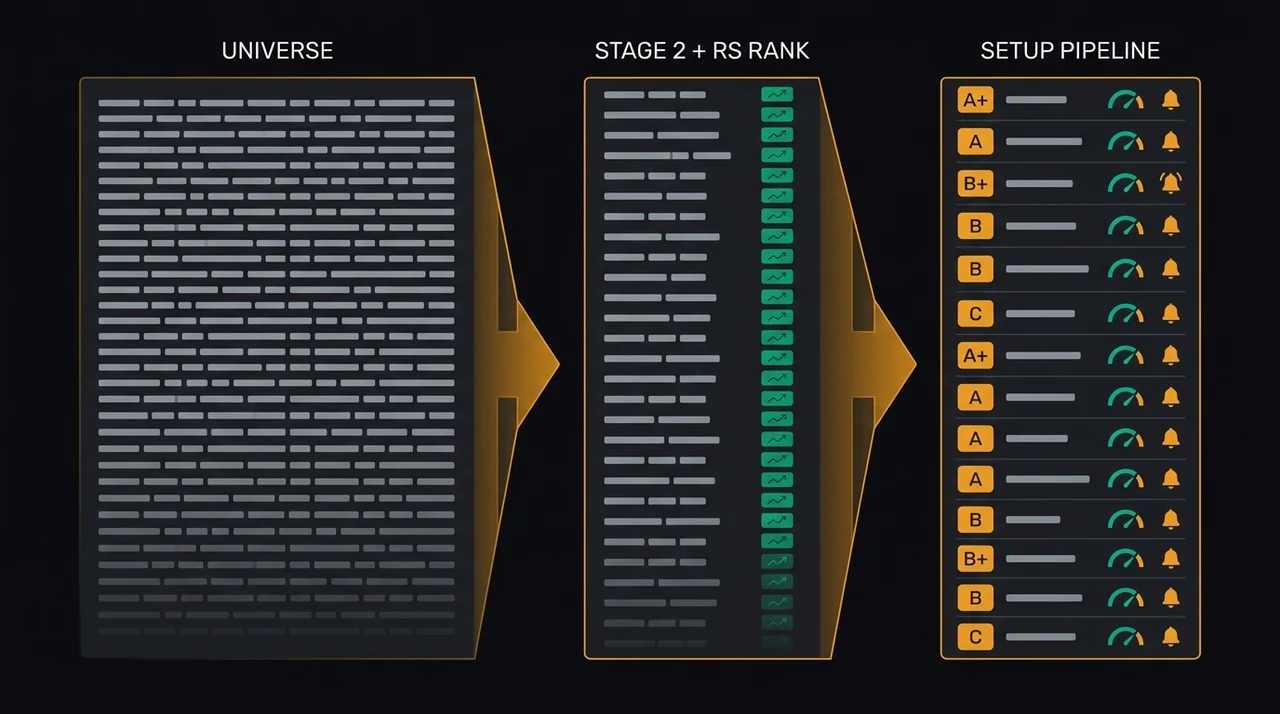
EasySwing.trading's free tier provides daily access to the live signal feed, market regime status, and strategy-filtered scan results across 2,000+ US equities. VCP, bull flag, trend pullback, and RSI reversion setups are labelled with a composite A+/A/B+/B/C quality grade. No filter configuration required — strategies are pre-built and run automatically each market close.
The core distinction is what EasySwing does instead of filtering. Rather than returning stocks that match raw criteria, it runs pre-configured strategy logic nightly and surfaces only stocks that meet all conditions for each named setup. A result labelled "VCP Breakout — Grade A" has already cleared:
- Stage 2 trend confirmation (MA stack in correct order)
- RS rank in the top quintile of all scanned stocks
- Three-to-four contraction sequence with decreasing price range
- Volume dry-up on each contraction leg
- Pivot proximity (within 5% of the breakout level)
This replaces a full manual screening session with a daily list of labelled, ranked candidates. The stock screener for swing trading guide covers the full workflow from scan result to position plan.
The free tier's main constraint is alert delivery. Telegram notifications for new setups require an upgrade. The screener results, regime label, and quality grades are accessible without a paid plan.
Finviz Free: Powerful Filters, No Pattern Detection
Finviz's free version offers over 65 technical and fundamental filters with a fast screener for US equities. It covers most Stage 2 building blocks through manual MA filter combinations, but lacks a native RS rank metric and has no named pattern detection. Saved screeners and real-time data require Finviz Elite ($24.96/month).
Finviz is the benchmark for filter-based screening. The free tier supports:
- Moving average filter combinations (approximate Stage 2 via MA sequencing)
- Price, volume, and market cap range filters
- Basic chart patterns (candlestick labels only — not composite patterns like VCP)
- Visual chart thumbnails for quick scan review
The practical limit for swing traders: assembling a Stage 2 + RS + volume + pivot proximity screen requires five or six manual filters that approximate, but don't replicate, what a swing-specific screener calculates natively. A stock can pass every filter and still be three weeks from a buyable entry.
For an in-depth comparison of workflow differences, the EasySwing vs Finviz guide covers how traders use Finviz for sector filtering and EasySwing for specific entry detection.
TradingView Free: Chart-First With Two Saved Screens
TradingView's free plan includes screener access with two saved filter configurations and the full filter library for US equities. Results link directly to TradingView's charting environment — clicking a screener result opens the full chart immediately. Real-time data, additional saved screeners, and alerts require Pro ($14.95/month).
TradingView's screener covers most technical indicators, and community-built templates provide starting points for swing setups. The chart integration is its strongest advantage: moving from a scan result to a detailed annotated chart takes a single click.
The two-saved-screener cap is the binding constraint. Swing traders running separate scans for VCP, trend pullback, and RSI reversion need at least three saved configurations; the free plan runs out at two. Unlike EasySwing, TradingView has no pre-built swing strategy modes — every filter must be built from scratch.
For traders who live on TradingView charts, the natural workflow is EasySwing for setup detection and TradingView for chart analysis. The EasySwing vs TradingView comparison explains how the two tools complement each other.
StockAnalysis.com and Barchart: Second-Pass Tools
StockAnalysis.com is fundamental-first: strong on earnings, revenue growth, margins, and float data; limited on technical screening depth. Barchart covers more technical indicators — ADX, ATR, RSI, and momentum oscillators — with solid MA filter support. Neither provides RS rank or pattern detection, making both most useful as complements to a swing-specific screener rather than primary tools.
StockAnalysis.com excels at fundamental verification. After identifying a swing candidate from EasySwing or Finviz, it provides clean data on revenue trajectory, EPS growth rate, float size, and institutional ownership. For primary technical screening, the filter depth is insufficient.
Barchart provides broader technical indicator coverage in the free tier than StockAnalysis. For traders who want indicator-based scans (ADX > 25, price above 50-day MA, RVOL > 1.5), it gives a workable base at no cost. The gaps remain: no RS rank, no pattern detection, delayed data on some indicators without Barchart Premier.
Both tools earn a place in a swing trader's workflow as second-pass confirmation tools — not as the primary screener.
The Feature Gap That Matters Most
The most consequential missing feature in every free filter-based screener is pattern detection. RS rank can be approximated with manual filters; Stage 2 can be assembled from MA conditions. But a VCP contraction sequence, bull flag structure, or pullback-to-MA geometry requires active analysis of a price and volume history — not a threshold you can type into a filter field.
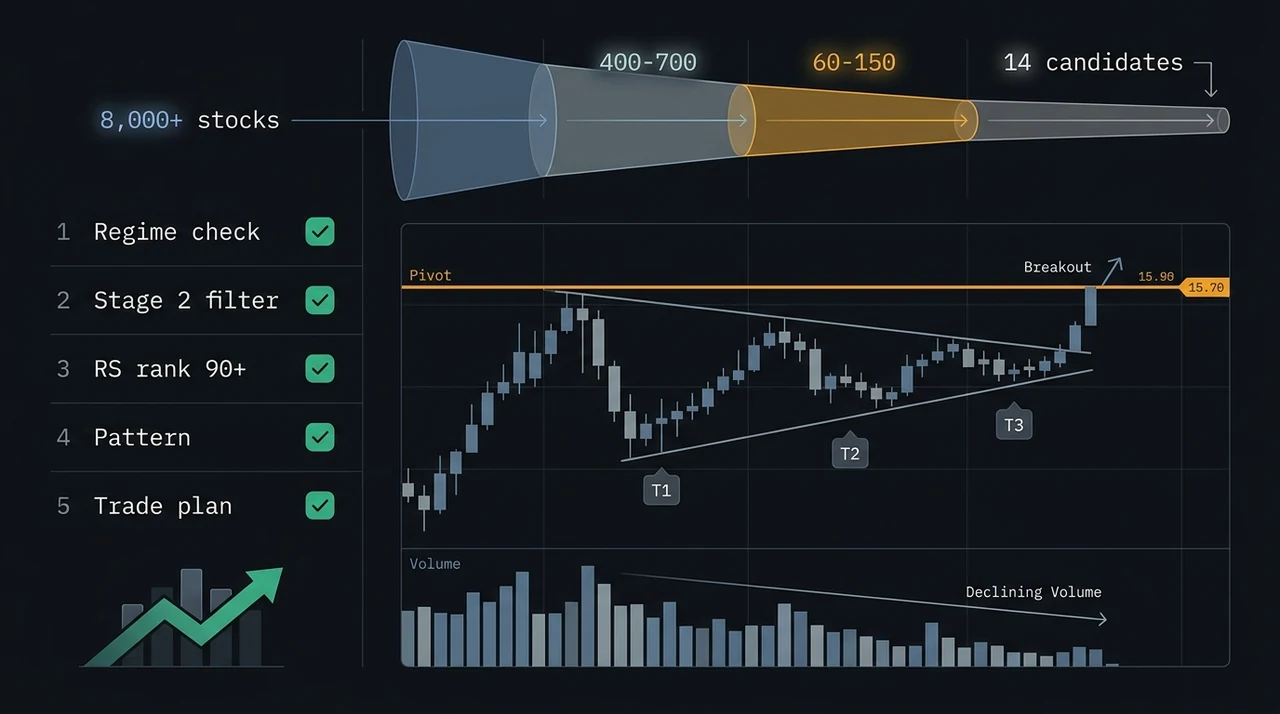
According to Minervini's framework in Trade Like a Stock Market Wizard (2013), systematic screening criteria should reduce a universe of thousands of stocks to fewer than twenty high-probability candidates at any given time. That reduction requires three sequential filters: trend, relative strength, and pattern.
A filter-based screener handles the first two. The third is where the field narrows.
Without pattern detection, a screener delivers 50–150 filter hits that require manual chart review to identify which, if any, are in a buyable structure. With pattern detection, you start with a labelled list of 5–20 confirmed setups. The difference in time spent is roughly the difference between a productive evening session and a frustrating one.
Free Screener Selection Checklist
Before committing to a free screener for your swing trading workflow, check against these criteria:
- ✅Filters for Stage 2 trend (price above 50/150/200-day MA stack)
- ✅Provides an RS rank or relative performance metric vs. the broad market
- ✅Detects or labels named chart patterns — not just raw filter matches
- ✅Generates a quality or confidence ranking across all daily results
- ✅Covers the market cap range you trade ($200M–$20B)
- ✅Has a clear upgrade path for alert delivery
- ❌Avoid screeners that return 300+ unranked results with no prioritisation
- ❌Avoid rebuilding the same filter set from scratch every session
- ❌Avoid day-trading scanners (float, RVOL, gap%) as a primary swing screening tool
A screener that passes the first three checks delivers the same starting list quality as a paid tool. The upgrade moment typically arrives when alert delivery — knowing the moment a setup triggers, not the next time you open the app — becomes the binding constraint.
FAQ
What is the best free stock screener for swing trading?
EasySwing.trading offers the most swing-specific functionality in its free tier: built-in RS rank, Stage 2 trend detection, and named pattern labelling (VCP, bull flag, trend pullback). No filter configuration required — strategies run automatically. Finviz and TradingView are strong alternatives for custom filter-based workflows, particularly if you already have a screening methodology you want to encode manually.
Can Finviz work as a free swing trading screener?
Yes, with limitations. Finviz's free version supports the MA filter combinations needed to approximate a Stage 2 scan and covers most volume and price range criteria. The gaps are RS rank (no native metric — only price percentage change) and named pattern detection (unavailable). Saved screeners require Finviz Elite. It works well for broad-universe filtering; use a swing-specific tool for entry pattern identification.
Does TradingView have a free stock screener?
Yes. TradingView's free plan includes screener access with up to two saved filter configurations and the full filter library. Results link directly to the charting environment — a genuine workflow advantage. The limitation is two saved screens, which is restrictive for multi-strategy swing traders. Real-time data and additional saved screens require Pro ($14.95/month).
What is RS rank and why does it matter for a stock screener?
RS rank (Relative Strength Rank) measures a stock's price performance over the trailing 12 months relative to all other stocks in the screened universe. A rank of 90 means the stock outperformed 90% of all others. O'Neil's IBD research found that stocks entering major advances had RS rankings averaging in the 87th percentile at the start of their move. Most free screeners return price percentage change — the stock's own history — which is not the same as its standing vs. the market.
Is a free stock screener accurate enough for swing trading?
Free screeners use the same underlying price and volume data as paid versions. For swing traders using end-of-day signals — the standard approach — free-tier data is fully sufficient. The upgrade cases are specific: real-time alert delivery to mobile when a setup triggers, and multiple saved screener configurations for multi-strategy workflows. Data accuracy is not typically the limiting factor at the free tier.
EasySwing.trading automatically screens for swing trading setups across 2,000+ US equities at each market close — VCP breakouts, trend pullbacks, bull flags, and RSI mean-reversion setups, each with an A+/A/B+/B/C quality grade and a pre-calculated entry, stop, and target. For a broader round-up that also covers paid tiers (TC2000, ChartMill, IBD MarketSmith), see Best Stock Screeners for Swing Trading: 7 Tools Compared. For 1-on-1 detail, see EasySwing vs Finviz and EasySwing vs TradingView. Scan results are for informational purposes only. See our Risk Disclaimer.
Frequently Asked Questions
What is the best free stock screener for swing trading?
EasySwing.trading offers the most swing-specific functionality in its free tier: built-in RS rank, Stage 2 trend detection, and named pattern labelling (VCP, bull flag, trend pullback). Strategies run automatically — no filter configuration required. Finviz and TradingView are strong alternatives for custom filter-based workflows.
Can Finviz work as a free swing trading screener?
Yes, with limitations. Finviz's free version supports MA filter combinations for approximating a Stage 2 scan and covers volume and price range criteria. The gaps are RS rank (no native metric) and named pattern detection (unavailable). Saved screeners require Finviz Elite. Best used for broad-universe filtering; pair with a swing-specific tool for entry pattern identification.
Does TradingView have a free stock screener?
Yes. TradingView's free plan includes screener access with up to two saved filter configurations and the full filter library. Results link directly to the charting environment. The limitation is two saved screens, which restricts multi-strategy workflows. Real-time data and additional saved screens require Pro ($14.95/month).
What is RS rank and why does it matter for a stock screener?
RS rank (Relative Strength Rank) measures a stock's 12-month price performance relative to all other stocks in the universe. O'Neil's IBD research found that stocks entering major advances had RS rankings averaging in the 87th percentile. Most free screeners return price percentage change — the stock's own history — which is not the same as its market-relative standing.
Is a free stock screener accurate enough for swing trading?
Free screeners use the same price and volume data as paid versions. For end-of-day swing trading, free-tier data is fully sufficient for identifying setups. The upgrade cases are specific: real-time alert delivery and multiple saved screener configurations for multi-strategy workflows. Data accuracy is not typically the limiting factor at the free tier.
Disclaimer: This article is for educational purposes only and does not constitute investment advice. EasySwing is a stock screening tool, not a registered investment advisor. All trading involves risk. Read our full disclaimer →