EasySwing vs TC2000: Which Screener Fits Swing Traders?
William O'Neil's analysis of every major winning stock from 1953 to 1985 (How to Make Money in Stocks, McGraw-Hill, 2009) produced one consistent finding: 95% of big winners broke out from a recognizable base structure. Identifying those stocks before the breakout — not after — is what separates swing traders who compound from those who chase extended moves.
TC2000 by Worden Brothers is the platform that a generation of CANSLIM and momentum traders built their scanning workflows around. Mark Minervini, two-time US Investing Championship winner and author of Trade Like a Stock Market Wizard (2013), has documented systematic scanning as a non-negotiable foundation of his methodology — and TC2000 has been part of that workflow for serious operators for decades.
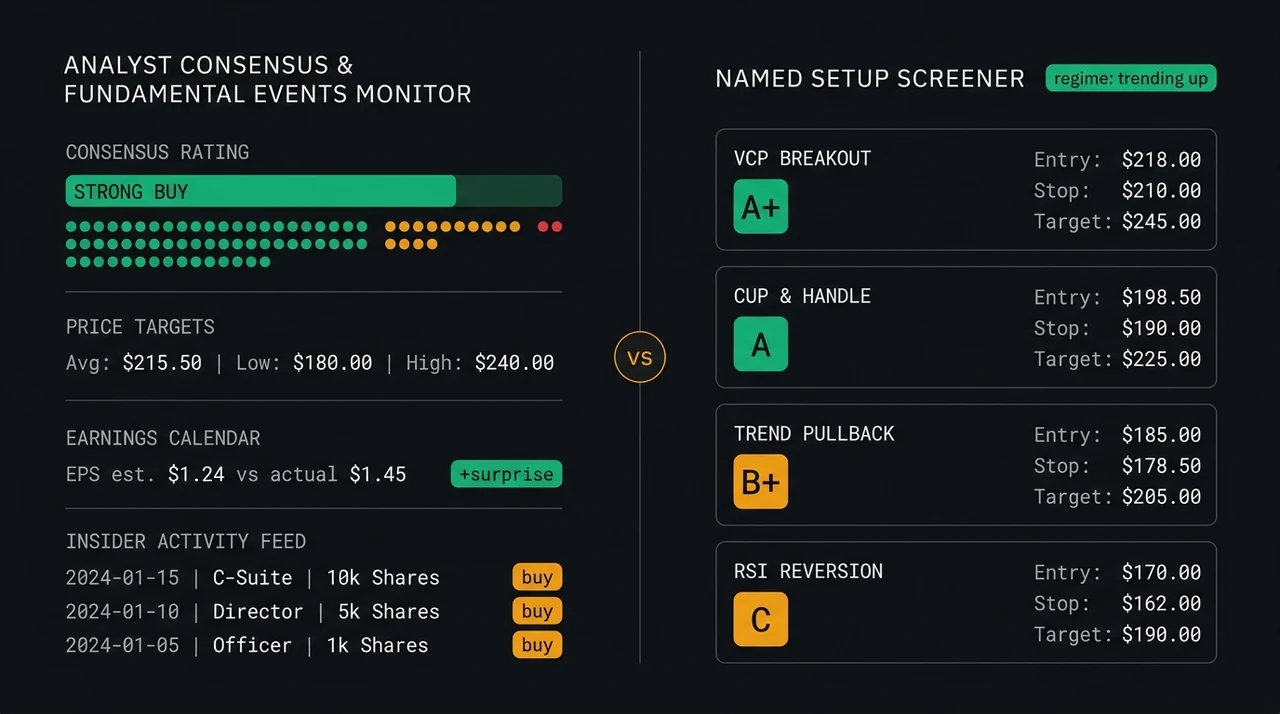
EasySwing.trading takes the opposite architectural approach: pre-detected setups, A+/A/B+/B/C quality grades, and real-time market regime filtering — no scan code required. This comparison covers the practical differences in screening model, quality scoring, regime awareness, and who each tool fits.
If you are evaluating both platforms, here is the short answer: TC2000 suits traders who already know their exact scan conditions and have the scripting vocabulary to express them in RealCode. EasySwing.trading suits traders who want strategy-detected, quality-graded candidates ready for review without writing or maintaining scan code. Experienced operators sometimes use both; traders newer to systematic scanning typically find EasySwing's pre-built structure saves significant ramp time.
What TC2000 Is Built For
TC2000 (Worden Brothers) has served active traders since the early 1990s, making it one of the most established charting and scanning platforms in US retail markets. Its flagship capability is EasyScan — a condition builder powered by RealCode, a proprietary scripting language that lets traders define virtually any technical or fundamental condition. WatchLists sync across web and desktop, price alerts fire in real time, and charting tools cover most patterns a momentum trader needs.
TC2000 attracts CANSLIM practitioners, Minervini-method operators, and chart-first traders who have spent years refining their exact scan conditions. If you know that a Volatility Contraction Pattern with RS line at 52-week highs and 40% volume contraction over five weeks can be expressed precisely in RealCode, TC2000 gives you the scripting environment to do it.
Plans range from a limited free tier to paid tiers with full charting and real-time scanning access. Check TC2000's current pricing directly — tiers and features change periodically.
TC2000 is a powerful, code-based screener with 30+ years of active-trader trust. It rewards operators who know their exact scan conditions and are comfortable expressing and maintaining them in RealCode. Less useful for traders who haven't yet built that scanning vocabulary.
What EasySwing.trading Does Differently
EasySwing.trading starts from the opposite assumption: most swing traders have solid pattern knowledge but don't want to translate it into scan code each week. The platform pre-detects thirteen named setups — including VCP Breakout, Trend Pullback, Bear Flag Short, RSI Overbought, Swing Condor, Cup and Handle, Qullamaggie Breakout, and others (see the strategies hub) — and surfaces matching stocks ranked by setup quality.
Each result carries a letter grade (A+/A/B+/B/C) based on how closely the stock matches the strategy's ideal entry conditions. Risk parameters — entry zone, stop level, and two profit targets — are pre-calculated from the strategy's own rules, not estimated. There is no scripting layer; detection logic is built into the platform and updated by the EasySwing research team.
The built-in AI coach, Soren, adds a natural-language layer: ask a question about any candidate stock and get context on why the setup qualifies, what the key risk factors are, and how the current market regime affects that setup's probability.
EasySwing.trading detects setups algorithmically, grades them A+/A/B+/B/C, and pre-calculates entry, stop, and target levels — no custom scripting required. Traders see strategy-matched, quality-graded candidates from day one, without a RealCode learning curve.
Screening Model: Scan Builder vs Setup Detection
TC2000 returns stocks that pass your filter criteria — pattern recognition and quality judgment happen after the screen runs, chart by chart. EasySwing runs multi-layer strategy detection and delivers a pre-graded list. The difference is where the synthesis happens: in the platform, or in the trader.
TC2000's model: Define conditions — price above 200-day MA, RS rank above 80, average volume over 500K, price within 5% of 52-week high. The screener returns every stock clearing those filters. You then review results chart by chart to identify which are in a tradeable setup. Advanced users build elaborate RealCode stacks that approximate swing trading criteria, but the pattern-recognition and quality-judgment work remains on the trader.
EasySwing's model: Select a strategy, or run all thirteen simultaneously. The engine evaluates conditions in sequence — Stage 2 trend structure, RS rank threshold, relative volume, pattern formation, and market regime gate. Stocks clearing every layer appear ranked by a 0–100 composite score. Pattern recognition and quality scoring are part of the engine.
| Dimension | TC2000 | EasySwing.trading |
|---|---|---|
| Scan method | RealCode scripting | Pre-built strategy detection |
| Learning curve | High (scripting required) | Low (strategy selection) |
| Flexibility | Unlimited — any codeable condition | 13 named strategies |
| Setup output | Raw filtered list | A+/A/B+/B/C grades + risk parameters |
| Maintenance | User-maintained | Platform-maintained |
| Free tier | Yes | No |
Neither model is objectively better. TC2000's blank canvas suits operators who have built their scan library over years. EasySwing's detection engine suits traders who want pre-validated, strategy-specific output without maintaining underlying scan code.
Setup Quality Grading and Pre-Set Trade Parameters
A gap common to most scan-based tools — TC2000 included — is that raw scan output doesn't distinguish between a textbook setup and a marginal one. A stock passing your conditions with a 3-week base and modest volume contraction is filtered the same as one with an 8-week base, tighter price action, and RS line at new highs.
EasySwing grades each setup on a five-tier A+/A/B+/B/C scale based on how closely it matches the strategy's ideal pattern:
- A+-grade: Near-perfect match — pattern tightness, volume behavior, RS rank, and regime all aligned. Highest historical win rate within the strategy.
- A/B+-grade: Strong setup with minor deviations — tradeable, but with elevated failure risk compared to A+-grade candidates.
- B-grade: Good setup meeting all minimum thresholds with some deviation from ideal conditions.
- C-grade: Marginal — visible pattern imperfections. Suitable for watchlist monitoring, not immediate action.
Every result also includes pre-calculated entry zones, stop levels, and two profit targets derived from the strategy's risk model. The stop isn't estimated — it's calculated from the pattern's own structure.
TC2000 users typically build quality-grading logic into their RealCode conditions over time by adding tightness filters, volume contraction conditions, and RS rank thresholds. That works if you've built it. EasySwing ships with it pre-built.
EasySwing's A+/A/B+/B/C grading layer and pre-set risk parameters reduce the judgment work at the point of entry. TC2000 gives you the tools to build that grading layer — but you build it yourself.
Market Regime Awareness
Most screeners operate the same way regardless of market conditions. In a confirmed distribution phase — the S&P under sustained selling pressure, fewer than 40% of stocks above their 200-day MA — TC2000 surfaces the same scan results it would in a confirmed Stage 2 bull. The trader reads the environment and filters manually.
EasySwing runs a five-regime market engine: Strong Bull, Weak Bull, Choppy, Weak Bear, and Strong Bear. Strategy weighting and candidate ranking adjust automatically. In a Strong Bear, long-biased setups like VCP Breakouts are de-emphasized; mean-reversion shorts and RSI Overbought setups move up the stack. In a Choppy regime, the Swing Condor (range-bound) strategy becomes the primary output.
Regime awareness doesn't remove discretion — it informs it. Traders still decide whether to act on any specific setup. But the regime layer means the tool's daily output is already calibrated to the current tape.
EasySwing's five-regime engine adjusts strategy weighting to current market conditions automatically. TC2000 has no built-in regime layer — traders read market conditions separately and apply their own regime-based filters to scan results.
Where TC2000 Holds the Advantage
A fair comparison acknowledges TC2000's genuine strengths.
Charting depth. TC2000's charting environment is more mature — drawing tools, custom indicators, multi-timeframe layouts, and annotation capabilities that serious chartists depend on. EasySwing's charts support trade research but are not a dedicated charting workstation.
Unlimited scan flexibility. If your edge depends on conditions outside EasySwing's thirteen strategies — earnings-gap-and-go setups, custom fundamental overlays, multi-leg technical composites — TC2000's RealCode gives you the scripting layer to build them. EasySwing's detection engine has a fixed scope.
Established user community. TC2000 has a large active user base, a maintained knowledge base, Worden Brothers support, and scan-sharing communities. For traders who rely on peer scan libraries and community forums, TC2000's ecosystem is broader.
Free entry point. TC2000 offers a free tier that allows exploration before committing to a paid plan. EasySwing does not currently offer a free tier.
TC2000 leads on charting depth, scan flexibility for custom strategies, community resources, and free-tier access. Traders whose edge lives outside EasySwing's thirteen strategies are better served by TC2000's configurable scan builder.
Who Each Tool Is For
The two platforms fit different trader profiles. TC2000 suits experienced scan operators with defined RealCode conditions and a need for deep charting tools. EasySwing suits traders who want strategy-detected, quality-graded candidates ready for daily review without maintaining custom scan code or building a regime-filtering layer from scratch.
Choose TC2000 if you:
- ✅Have defined scan conditions and want to express them precisely in RealCode
- ✅Rely on advanced charting — drawing tools, custom indicators, multi-timeframe layouts
- ✅Trade strategies outside EasySwing's thirteen detection models
- ✅Want access to an established scan-sharing community and Worden Brothers support
- ✅Prefer a free entry point before committing to a paid subscription
Choose EasySwing.trading if you:
- ✅Want setup detection across thirteen named strategies without writing scan conditions
- ✅Value A+/A/B+/B/C quality grading and pre-set entry/stop/target levels on every candidate
- ✅Want regime-filtered results that shift automatically with market conditions
- ✅Want a built-in AI coach for natural-language context on each setup
- ✅Prefer a screener built specifically for swing traders, not a general-purpose tool
- ❌EasySwing is not a dedicated charting environment
- ❌EasySwing does not support custom scan conditions outside its thirteen strategies
- ❌EasySwing does not offer a free tier
For a broader look at how EasySwing positions against other screeners in its category, see the comparison posts for EasySwing vs Finviz and EasySwing vs ChartMill.
Frequently Asked Questions
Can I use TC2000 and EasySwing.trading at the same time?
Yes. Some traders use TC2000 for chart annotation and custom scan research alongside EasySwing for daily A+/A/B+/B/C quality-graded setup lists. The platforms complement rather than directly conflict — TC2000 provides flexibility and charting depth; EasySwing provides pre-validated, regime-filtered structure.
Does TC2000 offer built-in setup quality grading?
TC2000 does not include a built-in quality-grading system. Experienced users encode quality conditions directly into RealCode scans — adding volume-contraction, pattern-tightness, and RS-rank filters to a base-breakout condition. That works, but requires time to build and validate. EasySwing's A+/A/B+/B/C grading ships out of the box.
Is EasySwing.trading a full replacement for TC2000?
No. EasySwing doesn't match TC2000's charting depth or RealCode scripting flexibility. It is a better fit for traders who want strategy detection and quality grading without maintaining custom scan conditions. Traders with established RealCode libraries that encode their tested edge have little reason to switch entirely.
Does EasySwing screen for fundamental factors like earnings growth?
EasySwing.trading focuses on technical setup detection rather than fundamental screening. It does not include CANSLIM-style filters such as EPS growth rate, ROE, or revenue acceleration. Traders who weight fundamentals heavily in stock selection should use TC2000's fundamental scan fields, or a dedicated fundamental screener, alongside EasySwing's technical setup output.
How long does initial setup take on each platform?
TC2000 has a meaningful learning curve — RealCode syntax takes time to learn, and building reliable scan conditions requires iterative testing and refinement. EasySwing's ramp is shorter: select a strategy, review graded candidates, evaluate setups. Most traders run their first EasySwing scan within 15 minutes of account creation.
EasySwing.trading automatically scans the full US equity universe daily, detecting setups across thirteen named swing trading strategies and grading each candidate on a five-tier A+/A/B+/B/C scale on pattern quality. Results adjust in real time by market regime. For a full breakdown of the strategies, see Swing Trading Strategies: 8 Proven Setups for Every Market. To compare EasySwing against other popular screeners, see EasySwing vs Finviz and EasySwing vs ChartMill. Scan results are for informational purposes only. See our Risk Disclaimer.
Disclaimer: This article is for educational purposes only and does not constitute investment advice. EasySwing is a stock screening tool, not a registered investment advisor. All trading involves risk. Read our full disclaimer →